
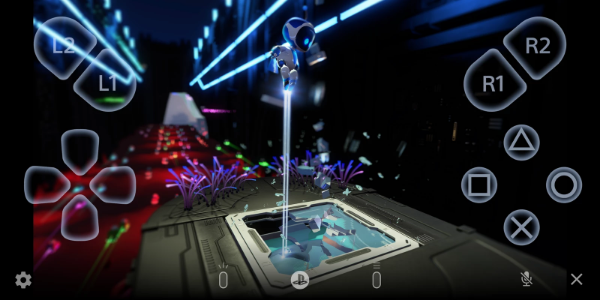
PS Remote Play takes gaming to the next level by letting you enjoy your PlayStation® experience far beyond your TV. Whether you have a PS5™ or PS4™, this app connects your console directly to your Android phone or tablet. Play your go-to games anytime, anywhere, with total flexibility.
Features and Functionality
PS Remote Play is packed with features designed to upgrade your play sessions:
1. Remote Screen Display:
- Stream the screen of your PS5™ or PS4™ directly to your Android device. Enjoy console-quality gaming in the palm of your hand, no matter where you are.
2. Mobile Control Options:
- Play seamlessly using the on-screen controller on your mobile device. For enhanced control, pair a DUALSHOCK®4 wireless controller (Android 10+), a DualSense™ wireless controller (Android 12+), or a DualSense Edge™ wireless controller (Android 14+) for that authentic console feel.
3. Voice Chat Integration:
- Jump into voice chats using your device's built-in microphone. Stay connected with friends and teammates while you play.
4. Text Input Capability:
- Type text on your PS5™ or PS4™ console with ease using your mobile device's keyboard. This makes in-game communication and app interactions a breeze.
5. Compatibility Requirements:
- To get started, you'll need: an Android device (version 9 or later), a PS5™ or PS4™ console with the latest system software, and an active PlayStation Network account. A stable and fast internet connection is crucial for smooth streaming.
6. Data Usage Considerations:
- When using mobile data, be aware that streaming games can use significantly more data than standard video streaming, which may lead to additional charges. Connection quality can also vary based on your carrier and network.
7. Verified Devices:
- For the best performance, PS Remote Play is optimized for specific devices like the Google Pixel 8, 7, and 6 series. Features and performance may be limited on unverified or unsupported devices.
8. Controller Compatibility:
- You have flexible control options: Use a DUALSHOCK®4 wireless controller with Android 10 and up, a DualSense™ wireless controller with Android 12 and up, or a DualSense Edge™ wireless controller with Android 14 and up.
9. Performance Considerations:
- Depending on your mobile device's power and your network, you might notice some input lag when using wireless controllers, which can affect in-game responsiveness.
Usage Guidelines and Notes
While PS Remote Play expands your PlayStation® gaming possibilities, please keep a few things in mind:
- Device Compatibility: For the best experience, use a verified mobile device. Unverified devices may not support all features or games.
- Game Compatibility: Not all games may be fully compatible with remote play or might need special setup.
- Controller Experience: Some controller features, like vibration, may not feel exactly the same as when playing directly on your PS5™ or PS4™ console.
- Input Lag: Due to varying device performance and network conditions, you could experience delays in controller input during gameplay.
Conclusion:
PS Remote Play is a game-changer for gaming on the go. It gives PlayStation® fans the freedom to play their favorite titles from their Android devices by seamlessly connecting PS5™ or PS4™ consoles with mobile platforms. Stream your gameplay, control your console, chat with friends, and interact with games using a variety of supported controllers. With practical features like mobile text input and real-time screen mirroring, PS Remote Play keeps you connected to your gaming world, wherever you happen to be.
v7.0.3
39.70M
Android 5.1 or later
com.playstation.remoteplay